

Setapp Review: Is It Worth It for Creators, Coaches & Entrepreneurs in 2026?
If you’re a creator, coach, or digital entrepreneur, your software stack is probably getting expensive.
One tool for writing. One for automation. One for design. Another for productivity.
Before you know it, you’re paying $100–$300 per month just to run your business.
That’s exactly where Setapp comes in.
Setapp is designed to replace dozens of individual subscriptions with one simple system.
In this guide, you’ll learn what Setapp is, how it works, which apps matter most, and whether it’s actually worth it for your business.
👉 Try Setapp today.
Quick Answer (Featured Snippet)
What is Setapp?
Setapp is a subscription service that gives you access to 240+ premium Mac and iOS apps for one monthly fee.
How does Setapp work?
You install the Setapp dashboard, browse available apps, and download any tool instantly without additional cost.
Why does Setapp matter?
It replaces multiple paid tools, reduces costs, and simplifies your workflow into one system.
What Is Setapp?
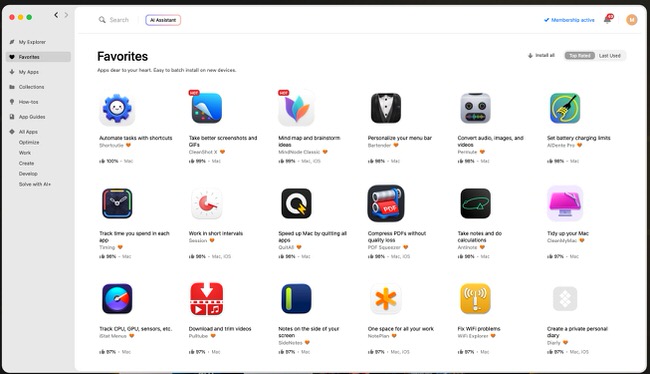
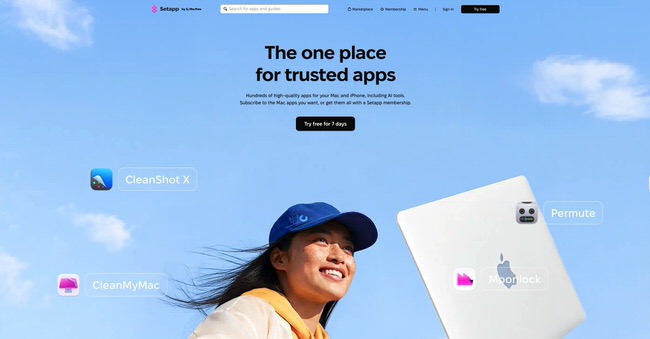
Setapp is often described as the “Netflix for apps.” Instead of buying software individually, you get access to a curated library of high-quality tools.
These apps cover everything from:
- Productivity
- Writing
- Design
- Automation
- System optimization
- Time tracking
The key advantage is simplicity. You don’t need to research tools, compare pricing, or manage licenses.
How Does Setapp Work?
Setapp works through a central dashboard installed on your Mac.
Here’s the simple process:
1. Sign up for Setapp
2. Download the Setapp app
3. Browse categories or search tools
4. Install any app instantly
5. Remove apps anytime without leftover files
This creates a frictionless system where you can test tools without risk.
Best Setapp Apps for Creators & Coaches
Here are some of the most valuable apps inside Setapp:
Ulysses – Writing tool for blog posts, scripts, and long-form content
CleanMyMac – Keeps your Mac optimized and fast
Paste – Clipboard manager that saves everything you copy
CleanShot X – Screenshot and screen recording tool
MindNode – Mind mapping and idea planning
Timing – Automatic time tracking
Many of these tools cost $20–$100/year individually, but are included in Setapp.
👉 Try Setapp today.
Turn Leads Into Paying Clients in 7 Days
I build conversion systems for course creators and high-ticket coaches using funnels, copy, and automation.
Instead of pushing for quick wins, we build funnels that:
Turn visitors into qualified leads
Convert leads into paying clients
Bring customers back through better experiences
What You Get
Conversion-focused funnel
High-converting copy
Automated follow-up (email + DM)
Clear lead-to-client journey
Why It Works
Most funnels focus on tools.
I focus on psychology, behavior, and flow—so it actually converts.→ Built in 7 days. Fully automated. Designed for consistent revenue
Send me a message or book a call to get started.
👉 Let's Build Your Client Conversion System
👉 Book A Strategy Session
How Setapp Saves You Money
At first glance, paying $9.99/month might seem like another subscription.
But here’s the breakdown:
If you use:
- A writing tool ($40/year)
- A clipboard manager ($30/year)
- A system cleaner ($40/year)
- A screen recorder ($60/year)
You’re already spending over $170/year.
Setapp replaces all of that for around $120/year.
This is why many users find it more cost-effective.
Who Should Use Setapp?
Setapp is ideal for:
- Course creators building funnels and content
- Coaches managing clients and systems
- Freelancers working across multiple tools
- Entrepreneurs optimizing workflows
It’s especially valuable if you like testing new tools or building systems.
It’s NOT ideal if:
- You only use 1–2 basic apps
- You prefer one-time purchases
- You don’t use a Mac
Why Setapp Works So Well
Most people waste time switching tools, comparing software, and managing subscriptions.
Setapp removes that friction.
You get:
- One subscription
- One ecosystem
- Unlimited tools
This makes it easier to focus on execution instead of tools.
Common Mistakes When Using Setapp
1. Installing too many apps
Stick to tools you actually use.
2. Not exploring categories
You might miss powerful tools.
3. Replacing tools too quickly
Give apps time before switching.
FAQ
What is Setapp used for?
Setapp is used to access premium apps for productivity, design, and business tools.
Is Setapp worth it?
Yes, if you use multiple apps regularly, it can save money and simplify your workflow.
Does Setapp work on Windows?
No, Setapp is designed for Mac and iOS users.
Can you cancel anytime?
Yes, Setapp subscriptions can be canceled at any time.
Conclusion
Setapp is not just another tool.
It’s a system that replaces your entire software stack.
Key takeaways:
- One subscription replaces dozens of tools
- Saves money over time
- Simplifies your workflow
- Helps you focus on execution
👉 Start your free trial here:
THANKS FOR READING
Ready to Scale? Here's How We Can Work Together
If you're ready to stop figuring it out alone and want a funnel system that actually converts — let's talk.
I offer Done-For-You (DFY) funnel builds for course creators, coaches, and digital product businesses.
👉 Let's Build Your Revenue System
👉 Book A Discovery Call
👉 Send Me A WhatsApp
👉 Email: [email protected]
👇 TOOLS I USE DAILY 👇
** These are affiliate links you can use to both support my work and save money,
so it's win-win for both of us. Thank you! ❤️ **
📺 Learn More on YouTube
👉 Subscribe to my YouTube Channel
My Equipment/GEAR I use: ► https://kit.co/MaikKleinert
ALL-IN-ONE Platform for Course hosting, Marketing & DM Automation:
👉 Course Creator 360 (CC360) ► Course hosting, marketing & automation.
👉 Course Creator Pro ► How to create an Online Course.
YouTube tools:
👉 🤖 VidIQ – AI‑Powered YouTube Growth 🚀
👉 🔴 Tubebuddy - YouTube Research tool
Video Editing Tools for Creators:
👉 🎨 DeHancer - 10% OFF code "MAIK" Film emulation,Filmlook,Halation,Bloom
👉 🎨 CineDream - Cinematic Color Grading Plugin, Film Looks, Click & Grade, Skin Tone Guides, Premiere / Resolve / FCP
👉 🖥 MotionVFX - Motion graphic plugin for Davinci Resolve, Premiere…
👉 🎶 ARTLIST - Music & SFX licensing
Productivity & Learning tools:
👉 Speechify ► helps ADHD individuals read audiobooks, websites, blogs, and emails.










Mail
Facebook
LinkedIn
X
Pinterest
Reddit
Snapchat