
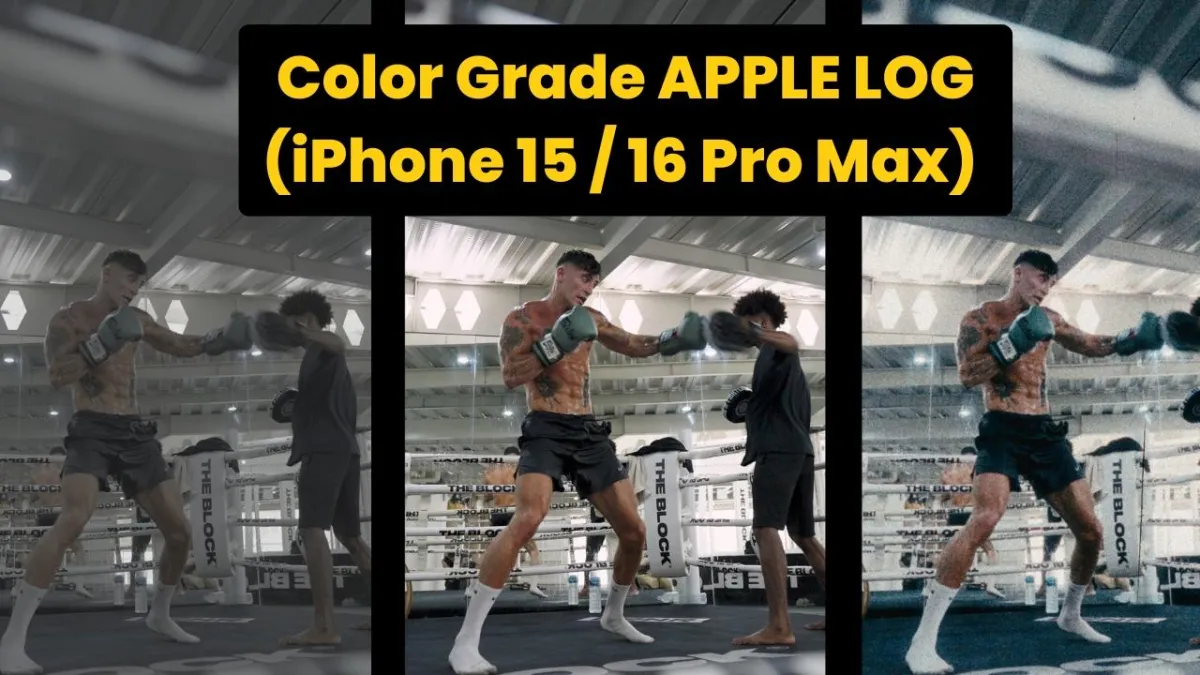
Color Grade iPhone 15 / 16 Pro Max Apple Log Footage With Dehancer Pro
Make your phone clips feel like real film—fast.
Why This Matters (Problem & Trends)
Phones now shoot Apple Log.
Log looks flat. Viewers want pop and mood.
True film stocks have grain, bloom, and halation.
Manual grading is slow and hard.
Creators need a quick, one-plugin fix to get the classic movie look on tight deadlines.
Table of Contents:
Color Grade iPhone 15 / 16 Pro Max Apple Log Footage With Dehancer Pro
The Fix: Dehancer Pro
Dehancer Pro is an OFX plugin for DaVinci Resolve or Adobe Premiere. It packs:
Grab Dehancer Pro with 10% Discount using the code "MAIK" today.
60+ film profiles with push/pull options.
Print stocks like Kodak 2383 and Fujifilm 3513.
Built-in grain, halation, bloom, film damage, overscan.
Camera profiles, LUT generator, and color pipelines for DWG, ACES, Cineon. (Dehancer)
Big Benefits
One node. One look. No tangled grade trees.
Real math, not overlays. Grain hugs the highlights.
Cross-platform. Works on Mac, Windows, and Apple Silicon.
Saves time. Finish spots, reels, or YouTube videos in minutes.
Common Mistakes to Dodge
Skipping project color-management setup.
Pushing film compression to 100% (makes HDR halos).
Adding grain before exposure is balanced.
Using print stock and heavy bloom—results look hazy.
Step-by-Step Guide
1. Set Up Your Project
Color science: DaVinci YRGB.
Timeline color space: DaVinci Wide Gamut Intermediate for max data.
Output: Rec.709-A on Mac or Rec.709 Gamma 2.4 on Windows.
2. Drop Clips In
Drag Apple Log MOV/ProRes files into a fresh timeline.
Keep iPhone footage on 10-bit chassis for smooth tones.
3. Add Dehancer Pro
Open the Color page.
Create a new node; place Dehancer Pro last in the chain.
4. Choose Camera & Balance
In Source, pick Apple → Apple Log.
Use Exposure slider until highlights kiss 1023.
Tap Color Density if saturation feels hot.
5. Film Development
Enable Film Compression.
Dial Total Range to ~50 to pull back bright skies.
Leave Developer neutral; tweak only if contrast still flat.
6. Pick a Film Stock
Open Film.
Try Kodak Vision3 250D for sunny days or Fujifilm Eterna 250T for night scenes.
Warm/cool with Push/Pull.
7. Add Character
Bloom - 35 mm, Radius 30 - Soft glow on highlights
Halation - 60 mm, 20% - Red edge flare for vintage vibe
Film Grain - 16 mm, ISO 400 - Subtle texture
Film Damage - 35 mm, 5% - Light scratches for nostalgia
8. Check & Trim
Toggle Monitor → False Color to spot clipping.
Use Output → Impact to fade the whole effect if needed.
Quick FAQs
Q1: Does Dehancer beat Resolve’s new film emulation?
Yes. It offers more stock choices and deeper control like overscan and breath. (Dehancer)
Q2: Can I use it on an M-series Mac?
Absolutely—native Apple Silicon support.
Q3: Will it work with HDR timelines?
Stick to SDR for now. Dehancer supports SDR grading in Resolve and FCP. (Dehancer)
Q4: Is there a Premiere version?
Yes, install the Adobe OFX build from Dehancer’s site.
Q5: How heavy is the render?
Grain and damage double render time; disable them for quick previews.
Key Takeaways & Next Steps
Apple Log + Dehancer Pro = instant film feel.
Set color management first, then let Dehancer handle the magic.
Fine-tune exposure and film compression before adding creative flair.
Ready to try?
Grab Dehancer Pro with 10% Discount using the code "MAIK" today.
Craft stunning, cinematic stories straight from your iPhone—no fuss, all film.
More Blog Posts about Dehancer Pro:
👉 5 Ways How To Color Grade Apple Log on iPhone 15 Pro Max
👉 Master the Cinematic Look: Exploring Dehancer Pro Plugin for Film Emulation
THANKS FOR READING
Ready to Scale? Here's How We Can Work Together
If you're ready to stop figuring it out alone and want a funnel system that actually converts — let's talk.
I offer Done-For-You (DFY) funnel builds for course creators, coaches, and digital product businesses.
👉 Let's Build Your Revenue System
👉 Book A Discovery Call
👉 Send Me A WhatsApp
👉 Email: [email protected]
👇 TOOLS I USE DAILY 👇
** These are affiliate links you can use to both support my work and save money,
so it's win-win for both of us. Thank you! ❤️ **
📺 Learn More on YouTube
👉 Subscribe to my YouTube Channel
My Equipment/GEAR I use: ► https://kit.co/MaikKleinert
ALL-IN-ONE Platform for Course hosting, Marketing & DM Automation:
👉 Course Creator 360 (CC360) ► Course hosting, marketing & automation.
👉 Course Creator Pro ► How to create an Online Course.
YouTube tools:
👉 🤖 VidIQ – AI‑Powered YouTube Growth 🚀
👉 🔴 Tubebuddy - YouTube Research tool
Video Editing Tools for Creators:
👉 🎨 DeHancer - 10% OFF code "MAIK" Film emulation,Filmlook,Halation,Bloom
👉 🎨 CineDream - Cinematic Color Grading Plugin, Film Looks, Click & Grade, Skin Tone Guides, Premiere / Resolve / FCP
👉 🖥 MotionVFX - Motion graphic plugin for Davinci Resolve, Premiere…
👉 🎶 ARTLIST - Music & SFX licensing
Productivity & Learning tools:
👉 Speechify ► helps ADHD individuals read audiobooks, websites, blogs, and emails.











Mail
Facebook
LinkedIn
X
Pinterest
Reddit
Snapchat